
There is a point in a cloud-native application’s journey when “it works” is no longer enough.
The containers are running. The Kubernetes cluster is scaling. CI/CD is deploying new releases.
But then the security questions begin:
- Who can access the cluster?
- What permissions does each workload actually need?
- Can an insecure container image reach production?
- Can one compromised service communicate with everything else?
- What happens if a deployment introduces a vulnerability?
For teams building SaaS platforms, fintech applications, healthcare platforms and enterprise workloads in India, these are not questions to postpone until after deployment.
They belong in the architecture. And that is where Kubernetes + DevSecOps becomes important.
Why Kubernetes Changes the Security Conversation
Kubernetes has become a central part of modern cloud-native development because it helps teams deploy and manage containerised workloads at scale.
India is now one of the world’s largest cloud-native developer communities. CNCF and SlashData estimate 2.25 million cloud-native developers in India as of Q1 2026, while 44% of Indian developers report using hybrid cloud. The same research found Kubernetes usage among Indian backend developers at 42%.
That growth creates an important question:
As Kubernetes adoption grows, are security practices evolving at the same pace?
A Kubernetes environment isn’t secure simply because the application is secure. Security has to exist across multiple layers:
Code → Container → Cluster → Network → Identity → Data → Runtime
This is the foundation of a DevSecOps approach.
DevSecOps Is Not “Security at the End”
A traditional development workflow can look like:
Develop → Test → Deploy → Security Review
The problem is that security becomes a checkpoint at the end. DevSecOps changes the mindset:
Develop → Scan → Test → Secure → Deploy → Monitor → Improve
Security becomes part of the development lifecycle rather than a separate team waiting at the finish line. For a Kubernetes-based application, that means asking security questions at every stage.
- Secure the Container Before It Reaches Kubernetes
Imagine a developer builds a new application container.
It works perfectly in development. The image is pushed to a registry. Then it is deployed into production.
But what if the image contains:
- an outdated dependency
- an unnecessary package
- a known vulnerability
- excessive privileges
- exposed credentials
The Kubernetes cluster cannot compensate for an insecure application image. The security process needs to begin before deployment. The Kubernetes project recommends image scanning before deployment and also recommends container signing to validate image integrity.
A practical DevSecOps pipeline therefore looks more like:
Code
↓
Dependency Scan
↓
Build Container
↓
Image Scan
↓
Security Validation
↓
Deploy to Kubernetes
↓
Runtime Monitoring
The earlier a problem is identified, the less expensive it generally is to address.
- Apply Least Privilege with Kubernetes RBAC
One of the most common mistakes in cloud environments is giving users or workloads more access than they actually need. Consider a development team with access to a Kubernetes cluster.
Does every developer need: cluster-admin?
Usually, NO. Kubernetes recommends applying the principle of least privilege when designing RBAC, using namespace-level permissions where possible and avoiding unnecessary wildcard permissions.
A better model is:
Developer
→ Access to development namespace
Application
→ Access only to required resources
Operations
→ Appropriate operational permissions
Security
→ Security and audit visibility
This reduces the potential impact of compromised credentials or misconfigured workloads.
The objective isn’t to make Kubernetes difficult to use.
It is to make permissions intentional.
- Don’t Let Every Pod Talk to Every Pod
Here’s another common cloud-native assumption: “They’re all inside the same cluster, so they can communicate.” That isn’t a security strategy. Imagine a SaaS platform with:
- frontend
- authentication service
- payment service
- analytics
- notification service
- database
Does the notification service really need unrestricted access to the payment service? Probably not.
Network Policies allow teams to define which traffic can flow to and from pods. Kubernetes documentation recommends restricting ingress and egress traffic to expected communication paths.
Conceptually:
Frontend
▼
API Service
├──────► Authentication
│
└──────► Payment
│
▼
Database
Instead of:
Everything ↔ Everything
This is one of the fundamental ideas behind reducing the blast radius of a security incident.
- Treat Pod Security as an Architecture Decision
A container doesn’t automatically become secure because Kubernetes is managing it.
Teams need to consider:
- privileged containers
- host namespaces
- Linux capabilities
- filesystem access
- CPU and memory limits
- security contexts
- workload isolation
Kubernetes provides Pod Security Standards with three levels:
Privileged → Baseline → Restricted
The Restricted profile follows stronger pod-hardening practices, while Baseline is intended to prevent known privilege-escalation patterns without imposing the strictest restrictions.
Kubernetes also provides Pod Security Admission, which can enforce these standards at the namespace level.
For organisations moving toward DevSecOps, this creates an important progression:
Warn → Audit → Enforce
Instead of switching on strict controls overnight and potentially breaking workloads, teams can progressively understand violations and move toward enforcement. Kubernetes specifically recommends using warn and audit modes as part of this transition.
- Protect Secrets Like Secrets
API keys. Database credentials. Tokens. Certificates. Private configuration.
These should not casually find their way into:
Git repositories → Container images → Logs → Configuration files
Kubernetes provides a Secret API for confidential configuration values, but teams still need an appropriate overall secrets-management strategy and access controls.
The DevSecOps principle is simple:
If a credential doesn’t need to be visible, don’t make it unnecessarily visible.
And periodically ask:
- Who can access it?
- Why do they need access?
- How long should that access exist?
- Secure the Kubernetes Network and Control Plane
The Kubernetes API is one of the most important control points in the environment.
If access to the control plane is poorly managed, the security impact can extend far beyond one application.
Kubernetes security guidance recommends restricting exposure of the Kubernetes API, kubelet API and etcd, while using appropriate authentication, authorization and encryption controls.
This is why Kubernetes security isn’t only an application team’s responsibility.
It involves:
Developers
- DevOps/SRE
- Security
- Cloud Infrastructure
working together.
That is essentially the DevSecOps operating model.
- Security Doesn’t End at Deployment
This is perhaps the most important point. A secure deployment today doesn’t guarantee a secure deployment tomorrow.
- Applications change.
- Dependencies change.
- Container images change.
- Configuration changes.
- Attack techniques change.
- Teams change.
So security needs to continue into production.
That means combining:
- Monitoring
- Logging
- Vulnerability management
- Access reviews
- Security alerts
- Backup & recovery
- Incident response
with the application lifecycle.
The Kubernetes security checklist itself covers areas including access reviews, RBAC, network security, pod security and control-plane protection.
A Practical Kubernetes DevSecOps Architecture
For a typical cloud-native application, the security journey can look like this:
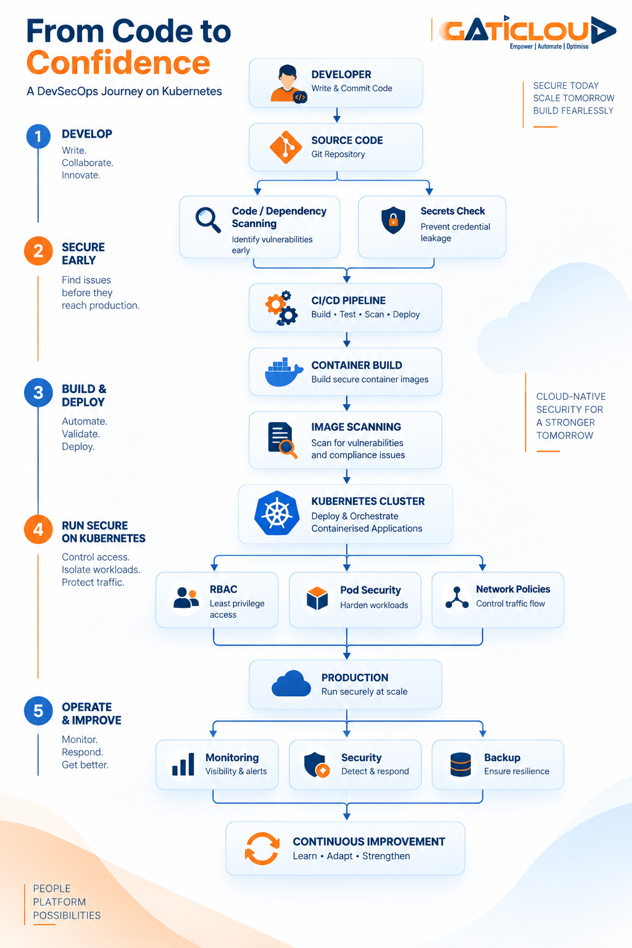
The important point is that security isn’t one box in this architecture. It runs through the entire architecture.
What Does This Mean for Indian Startups and SaaS Companies?
For an early-stage startup, this doesn’t mean implementing every security control imaginable. That can create unnecessary complexity.
Instead, ask:
- At the beginning
- Are our credentials protected?
- Are our images scanned?
- Are access permissions appropriate?
- As we scale
- Are workloads isolated?
- Are network policies defined?
- Are Kubernetes permissions reviewed?
- Are security controls automated in CI/CD?
- As we become enterprise-ready
- Can we demonstrate our security controls?
- Can we monitor and audit access?
- Can we recover critical workloads?
- Can our infrastructure support customer and regulatory requirements?
India’s cloud-native ecosystem is already moving toward more advanced operational practices, including observability, platform engineering, service meshes, multicluster management and hybrid cloud.
Security therefore needs to mature alongside infrastructure.
Where GatiCloud Fits In
At GatiCloud, we see Kubernetes as more than a way to run containers. It is part of a broader application platform.
Our Managed Kubernetes service is designed for production-grade clusters, with high availability, autoscaling and enterprise security, while allowing teams to work with standard Kubernetes tooling such as kubectl and existing CI/CD pipelines.
Around Kubernetes, teams can also build an infrastructure stack using GatiCloud’s:
Virtual Instances
For cloud compute workloads across development and production.
Managed Databases
With supported databases including MySQL, PostgreSQL, Redis, MariaDB and MongoDB, alongside automated backups, failover, private networking and encryption in transit and at rest.
Developer Tools
Including Jenkins, GitLab, Docker, Portainer, Apache Airflow, Node.js, Django and Spring Boot for development and deployment workflows.
The goal is straightforward:
Give development, DevOps and security teams a cloud foundation on which they can build secure, scalable applications without unnecessarily increasing infrastructure complexity.
For organisations operating in India, GatiCloud also positions its cloud infrastructure around India-focused hosting and data sovereignty.
Kubernetes Security Is a Journey, Not a Checkbox
There is no single Kubernetes setting that makes an application secure. There is no single DevSecOps tool that solves the problem either.
Security comes from putting the right controls at the right points:
- Secure the code.
- Secure the image.
- Secure the workload.
- Secure the network.
- Secure access.
- Monitor the runtime.
- Prepare to recover.
And most importantly:
Keep improving.
For Indian startups, SaaS companies and enterprises adopting cloud-native architecture, that approach can make security part of engineering culture rather than a last-minute compliance exercise.
Ready to Build More Secure Cloud-Native Applications?
If your team is:
- moving from VMs to containers,
- adopting Kubernetes,
- building a new SaaS platform,
- modernising an existing application,
- strengthening CI/CD security, or
- reviewing its cloud-native architecture,
the right place to start isn’t necessarily with another security tool.
Start with the architecture.
Talk to the GatiCloud team about your workload, deployment model and growth plans, and explore where Managed Kubernetes, cloud compute, managed databases and developer tooling can fit into your environment.
Explore GatiCloud Kubernetes & Cloud Services
Build secure. Deploy confidently. Scale with GatiCloud.
Q&A
What is Kubernetes DevSecOps?
Kubernetes DevSecOps integrates security controls throughout the lifecycle of containerised applications running on Kubernetes from code and image scanning through deployment, access control, network security and runtime monitoring.
How do you secure a Kubernetes cluster?
A Kubernetes security strategy typically includes strong authentication and RBAC, least-privilege access, Pod Security Standards, Network Policies, secure container images, secrets protection, restricted control-plane exposure and continuous monitoring.
What are the main Kubernetes security risks?
Common areas requiring attention include excessive privileges, vulnerable container images, exposed APIs, weak network isolation, poorly managed secrets and insecure workload configurations.
Why is DevSecOps important for Kubernetes?
Kubernetes accelerates cloud-native deployment, but its distributed architecture introduces multiple security control points. DevSecOps integrates security into development, CI/CD, deployment and runtime operations instead of treating it as a final review.
Is Kubernetes secure by default?
Kubernetes provides important security mechanisms, but a production cluster still requires deliberate configuration of access controls, workload security, network policies, secrets, API exposure and other controls. Kubernetes itself publishes a security checklist for these areas.
